Contoh 3
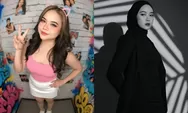
“A hyper-realistic studio portrait of my face with long wavy black hair, wearing maroon tube top, looking over her shoulder with a soft, confident expression. Captured with professional fashion photography lighting and camera set up with maroon background.”
Contoh 4
Create a photo of me, see the reference photo in a a high-fashion studio same skin in the photo and long messy black hair. She wears a black oversized blazer layered over a white tube top, with a sheer white ribbon tied in a bow around her neck. She poses with her head tilted slightly to the side, gazing softly at the camera with a dreamy, calm expression. A loose strand of hair falls across her face, adding elegance. Soft diffused lighting against a plain white background
Baca Juga: 3 Prompt Gemini AI Foto Wedding Pakai Baju Adat Jawa, Bisa Buat Foto Nikah Estetik
Selain menyiapkan prompt yang detail, pengguna juga perlu memahami langkah-langkah dasar mengedit foto dengan Gemini AI.
Cara Edit Foto Menggunakan Gemini AI
-Masuk ke situs gemini.google.com melalui browser, lalu login dengan akun Google.
-Pilih foto berkualitas tinggi agar detail terlihat lebih jelas.
-Siapkan prompt yang lengkap dan mendeskripsikan hasil yang diinginkan.
-Klik ikon kirim atau tekan Enter, lalu tunggu beberapa detik hingga hasil edit muncul.
-Unduh hasil edit foto dan langsung bagikan ke Instagram, TikTok, atau simpan sebagai koleksi pribadi.
Baca Juga: 5 Prompt Edit Foto Bayi Newborn Pakai Gemini AI, Hasilnya Mirip Studio Profesional
Semakin detail prompt yang digunakan, semakin maksimal hasil edit foto ala model majalah yang ditampilkan Gemini AI.